Schedule quality check: what to check in every Primavera P6 update, and why.
A contractor's update arrives, and the reviewer has days to accept it or send it back. What a schedule quality check is for, the published criteria it rests on, where those criteria stop, and how ploteer runs the check on every update.
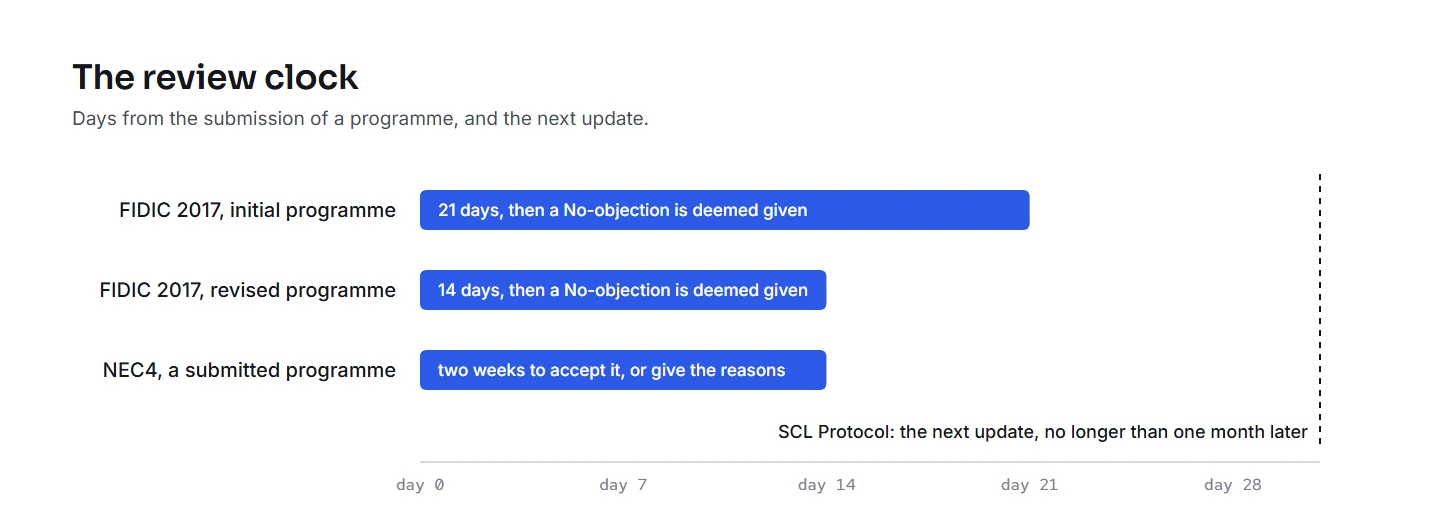
Every two weeks or every month, a Primavera P6 update lands on the reviewer’s desk, and the contract sets the clock. Under FIDIC’s 2017 conditions, if the Engineer gives no notice within 21 days of the initial programme, or 14 days of a revised one, a No-objection is deemed given (Sub-Clause 8.3). Under NEC4, the Project Manager accepts a submitted programme, or gives the reasons for not accepting it, within two weeks (clause 31.3). In that time the reviewer has to say whether the update is fit to use. A schedule quality check is the mechanical half of that answer: a fixed set of checks, each against a stated threshold, run the same way on every update.
Why every update needs one
The update is the record. A US federal appeals court held that, where the contract called for it, delay from each change is measured on the schedule current as of the date the change was issued (P.J. Dick v Principi, 2003). In England, in Walter Lilly v Mackay (2012), the court preferred the expert whose analysis followed the logical sequence of events on the longest path, a much more objective approach, and called the other expert’s weighted matrix worthless and self-fulfilling. Both experts had worked without a usable contemporaneous programme from early 2007 on (paragraphs 98 and 99). The SCL Delay and Disruption Protocol recommends updates at intervals of no longer than one month, each saved as a separate file with a report of its revisions, and no version overwritten (2nd edition, §1.58 and §1.59).
An update that is wrong when it is accepted stays wrong in the record. The cheapest moment to find a backdated actual, a forecast left in the past or a switched scheduling option is the week the update arrives.
How it must be done
- On every update, at the time. Not once a quarter, and not when a claim is already on the table.
- Against the accepted baseline and the update before. AACE’s recommended practice for update reviews (53R-06) is there to confirm that an update meets the specified standards and shows the status and forecast as of its status date. The baseline it all rests on has its own review (78R-13).
- The same checks for every submitter. One rule set, the same thresholds, so the comment to one contractor reads like the comment to the next.
- Every threshold stated, with its source. A finding the contractor can argue with is a finding about the threshold, not the schedule. Say whose figure it is, and where the contract’s scheduling specification sets its own, use that.
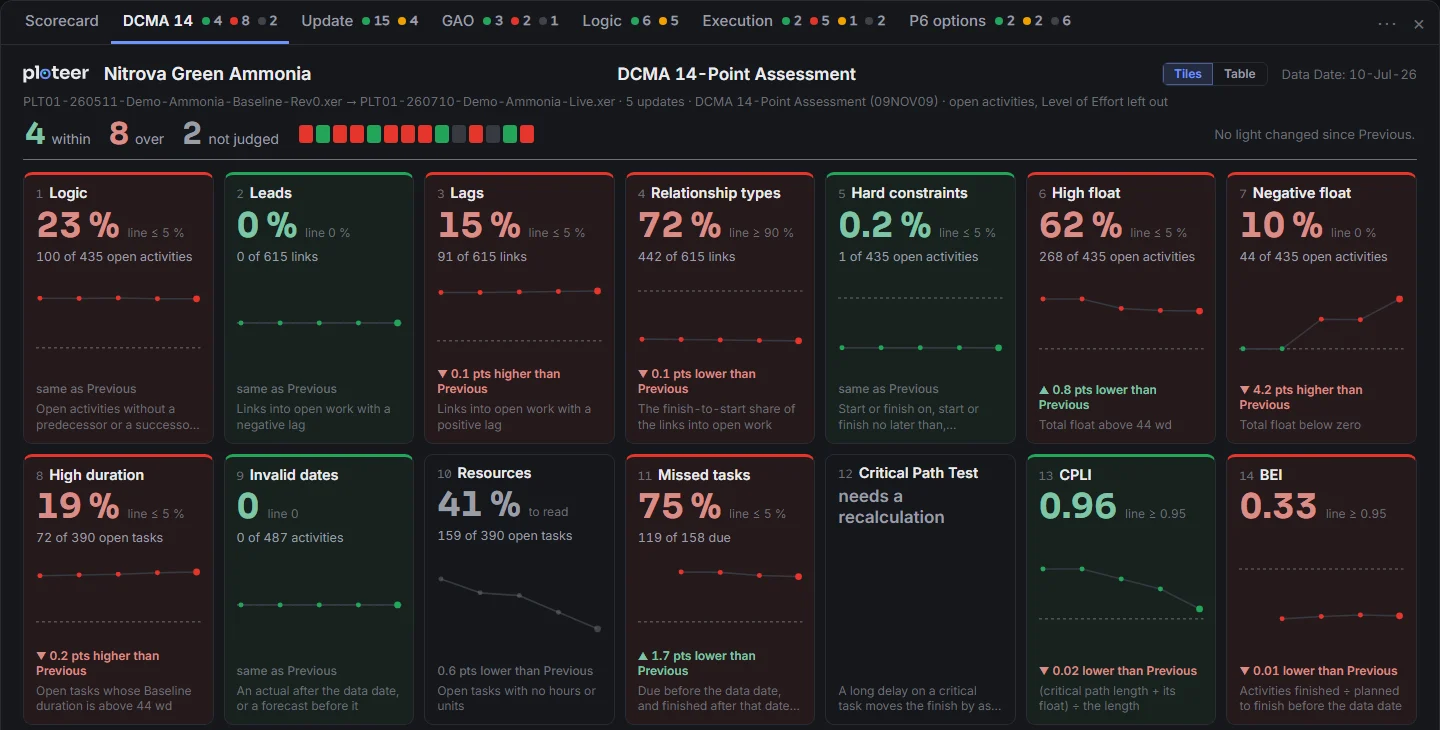
- The activities behind every count. “Logic: 23 %” starts a discussion; the list of activity IDs ends it.
- The critical path definition stated. AACE’s practice on identifying the critical path (49R-06) defines it as the longest logical path through the network; a total float threshold can give a different set, so say which one the review uses. The near-critical paths deserve the same attention (92R-17).
- The narrative read beside the file. Every change by activity ID, what changed and why, the out-of-sequence work, and, when the longest path changes, the factors behind it, as the US Army Corps of Engineers’ specification asks (UFGS 01 32 01.00 10). And whether the comments on the last update were closed.
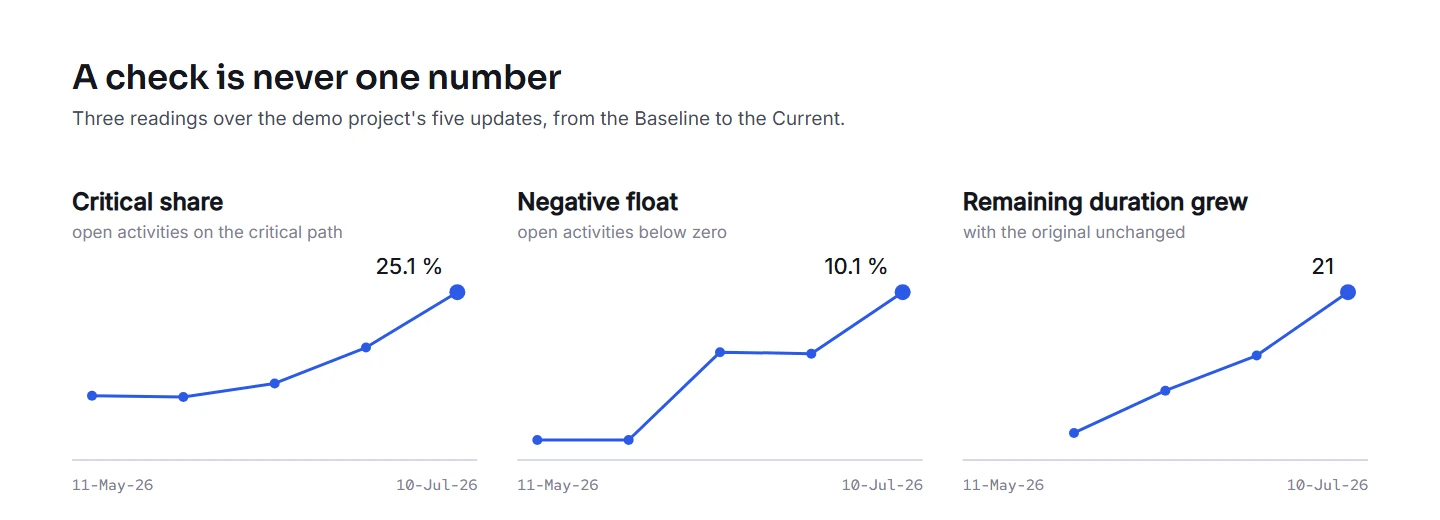
- Every reading kept. The trend over the updates says more than any single reading.
The criteria, from the published sources
DCMA’s 14-point assessment is the common language (DCMA PAM 200.1, 2012). It leaves out completed tasks, Level of Effort, summary tasks and milestones; missed tasks and BEI count the baselined tasks due by the status date. The points: missing logic at most 5 %, no leads, lags at most 5 %, finish-to-start links at least 90 %, hard constraints at most 5 %, total float above 44 working days at most 5 %, no negative float, durations above 44 working days at most 5 %, no invalid dates, resources (a count, with no threshold), missed tasks at most 5 %, the Critical Path Test, and two indices, the Critical Path Length Index (CPLI) and the Baseline Execution Index (BEI), each flagged below 0.95. The Critical Path Test puts an intentional slip on the critical path and checks that the finish moves by as much; it needs the schedule recalculated. DCMA itself calls the checks a framework for asking educated questions.
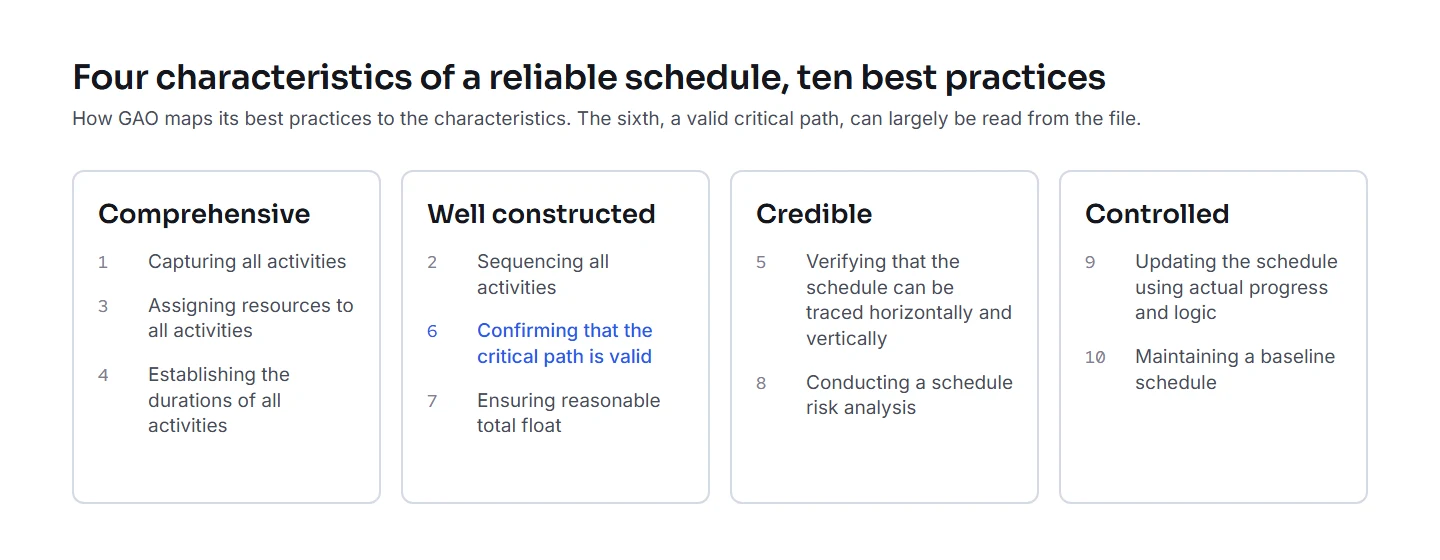
GAO’s Schedule Assessment Guide (GAO-16-89G) sets ten best practices under four characteristics of a reliable schedule: comprehensive, well constructed, credible and controlled. For the sixth, a valid critical path, its measures include: a path continuous from the status date to the key milestone, the critical activities in progress, no level of effort on it, and the lags, leads and hard constraints on it counted. When the critical activities are nearly all of the remaining work, GAO says the schedule may be overly serial.
Update integrity is where the update review lives. Forecast dates left before the data date mean the file was not scheduled to its data date before it was sent. Actual dates that change after they were reported change the record. DCMA’s EVMS test metrics flag actual starts and actual finishes changed after first reported above 10 % each (06A504a, 06A504b), and forecasts riding the status date two months running above 1 % (06A506c). A good review counts out-of-sequence progress too, not only the setting that schedules it.
Logic quality goes further than DCMA. NASA’s handbook describes redundant logic among the faults to look for (NASA). The US Department of Energy gives typical thresholds, among them 15 % for start-to-start and finish-to-finish links, 1 % for leads, and lags above 22 working days to be justified (DOE G 413.3-24). The Saudi EXPRO procedure reads more than three relationships per activity as heavy logic, and more than four as a high probability of redundant logic (EXPRO).
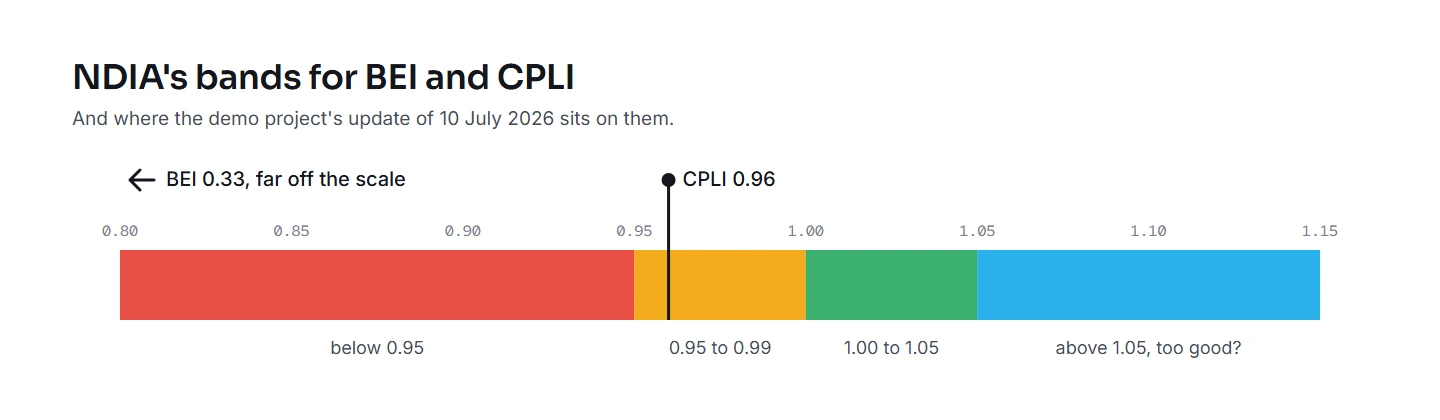
Execution asks whether the work is finishing as forecast. NDIA’s planning guide states that it sets no thresholds, but says a sound forecast schedule trends above 75 percent on its Current Execution Index (PASEG v6). Its predictive measures guide bands BEI and the schedule indices: above 1.05 blue, “too good?”; 1.00 to 1.05 green; 0.95 to 0.99 yellow; below that, red (Rev 4, 2025). Earned Schedule turns progress into time: SPI(t); the forecast finish at the pace so far, IEAC(t) = planned duration ÷ SPI(t); and the pace still needed, TSPI, which Lipke reads as unachievable above 1.10 (Lipke, Earned Schedule: ten years after). The same paper reports the research behind it: in simulations, Vanhoucke and Vandevoorde found that Earned Schedule outperforms, on average, the other earned value methods of forecasting duration, and Vanhoucke later found it forecasts best when the network is serial, less reliably as it becomes parallel.
Scheduling options are the settings in P6’s own Schedule dialog, and they change dates without any change in the work. A switch from retained logic to progress override is the classic. The US Army Corps of Engineers’ specification sets them: critical activities by the longest path, progressed activities by retained logic, and physical percent complete (UFGS 01 32 01.00 10). A setting that changed since the update before is a question for the next comment sheet.
Where the criteria stop
We found no peer-reviewed study showing that schedule quality metrics such as DCMA’s predict delay. The one correlation study we found, on 35 large projects, came from the head of a schedule-analysis software firm (via Mosaic). Practitioners warn that conforming to the checks does not by itself make a schedule sensible or achievable (Mosaic, WP1088), and ask whether the checks are a ticking time bomb once a schedule is in dispute (Winter, 2011). None of the checks reads the basis of schedule, durations against production rates, the construction method or the risk.
Some tools sum the checks into one number, but the weights are a choice, not a standard. Each red light is a question to ask the contractor, and the reviewer judges the answer.
How ploteer runs it
ploteer reads every Primavera P6 update the moment it is imported, on its own and against the update before, and keeps the reading. Seventy checks in six families: DCMA’s 14 points, update integrity, GAO’s critical path checks, logic quality, execution, and P6’s scheduling options. Every threshold names whose it is, with the source one click away; where the scheduling specification has its own, the project sets it, and a changed threshold is marked wherever it shows.
Each check shows its light, its reading against its threshold, its trend over every update and its move since the last one, in tiles or as a table with every update a column. A click on a check filters the schedule to the activities behind it. The findings sit on each activity’s card and in the grid’s Findings column, and the grid goes to Excel for the review comments. The tables go to Excel, a sheet per family; the tabs to PDF or PowerPoint, ready for the review report and the board. A resubmission with the same data date is kept as a revision of that update. DCMA’s Critical Path Test needs a recalculation, and its tile says so rather than guess. ploteer never writes back to P6, and Fogg, asked how an update reads, answers from the lights and the counts.
The Advanced quality check shows it on the demo project, tab by tab. Book a demo to see it on an update, in the room.
Let us meet for the demo.
Book a demo